

NEW RELEASES
Fresh Features, Just for You!
We’ve been busy building new tools to make your life easier in SportsEngine Motion. Check out what’s new — you might just find your next favorite feature!
Bookmark this page.

Calendar Reschedules
Release date: December 3, 2025
You can now reschedule, move, and cancel classes all from the calendar!
- Reschedule a single occurrences of class to a different date and time! Only rule is that it must be within a year of the original date and can’t overlap with another occurrence of that class.
- Moving location and zones for an occurrence of a class. Field rained out? Studio experiencing unexpected maintenance? We got you.
- Canceling a single occurrence of a class because things went sideways. If things get back to normal, the class can be reinstated.
- New Calendar settings for admins to set the default message for all these actions so that communication is consistent each and every time.

New Waitlist Email
Release date: October 20, 2025
Our new waitlist email shows the key message at the top, better organized class details, and a clear next steps section.
This enhancement provides clearer messaging for members who sign up on the waitlist. Bolder messaging at the top, all class details displayed in the body of the message, and next steps shown at the bottom, will lessen confusion for those members on the waitlist!
Mobile Registration
Release date: October 15, 2025
Parents can now easily browse and register for classes within the app!
- Quickly narrow options with filters for age, location, and more
- Complete registration using flexible payment choices
- Skip the desktop and sign up anytime, anywhere

Gender Options
Release date: October 14, 2025
Organizations can manage which genders are shown when accounts are creating members during registration.
These can be changed at any time and the system will prompt users to select a different gender if it has been removed by the organization. In addition, new accounts are no longer required to select a gender as Motion doesn’t use account gender during the registration process.
Organizations can change the genders displayed by going to Business Tools > Org Profile & Settings, and scrolling to the bottom.
Email Templates
Release date: October 13, 2025
Create and utilize new email templates to save time!
Our email center started this year with a big revamp and it’s been getting better each and every month. In the new templates tab, you will be able to create a new template and use them from the email center, accounts, and even the calendar. You can also personalize emails with tags that will automatically fill-in a person’s full name, email address, first name, or last name.
Our new Email Templates will help take admin communication up a level, save them time, and bring consistency within organizations using SportsEngine Motion.
3D Secure (3DS) in Motion
Release date: September 23, 2025
Introducing everyone to 3D Secure payment
We have hundreds of transactions per month where a banks requests 3DS and we fail those transactions and require another card to be entered. No more!
Check out the video to see how this new feature works in Motion!
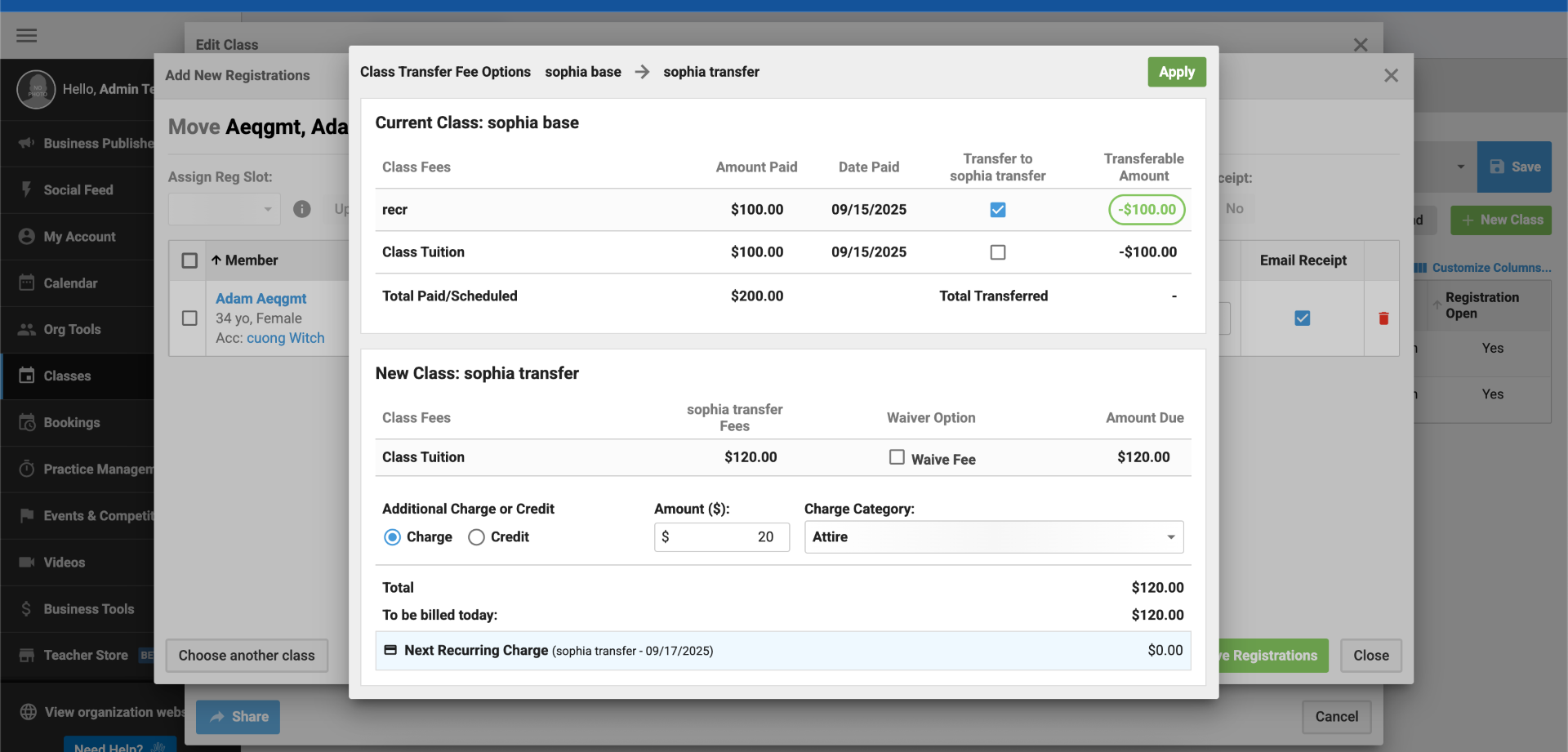
Class Transfer Flow Update
Release date: September 17, 2025
Key Improvements:
- Clear separation of Current Class and New Class sections
- More prominent call-to-action for key options (payment transfer, fee waiving)
- Improved handling of optional charges and credits
- New Apply button to preview totals without closing/reopening
Check out the updated help resources:

Verify SMS Upgrade
Release date: September 3, 2025
With this release, you can now:
Send SMS notifications to All
The option to send SMS verifications to everyone in your AMA list is now available. So all those admins who want to start the verification process in-mass, go crazy!
Verify SMS at Checkout
Accounts will now have the option to verify their phone number right in checkout. A little checkbox can make things so much better!
Installment Plan Updates
Release date: August 18, 2025
What’s new:
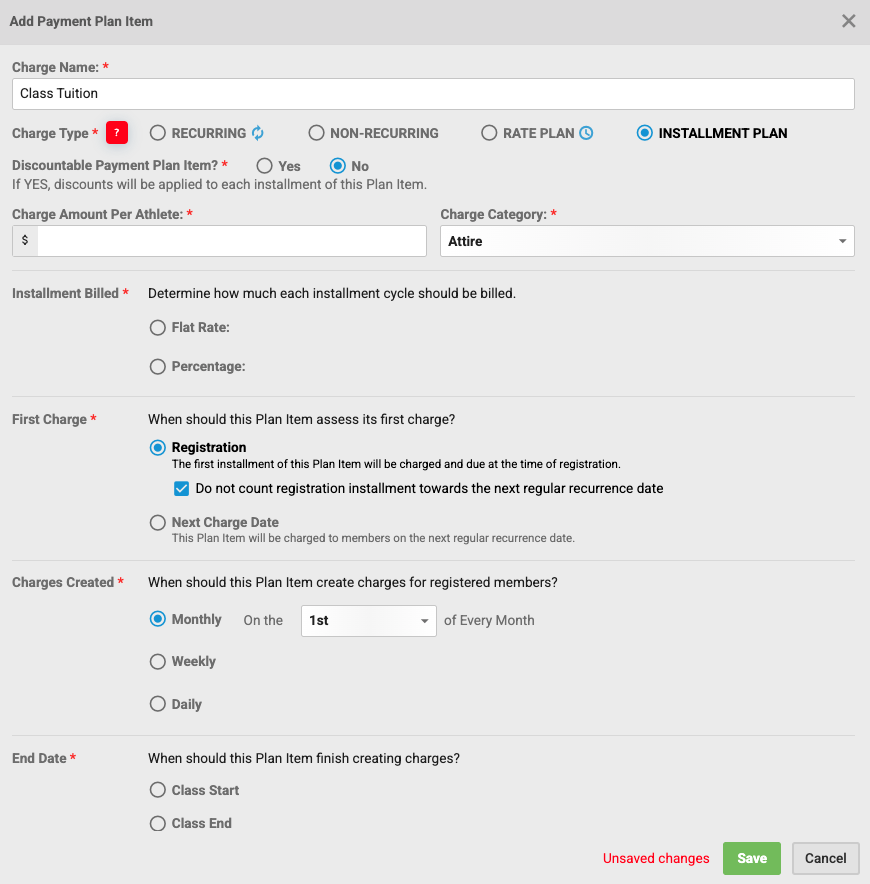
We’ve released a new option to give admins more control over how first payments are handled in installment plans.
When creating an installment plan, under First Charge → At registration, you’ll now see a checkbox:
“Do not count registration installment towards the next regular recurrence date.”
What it does:
- If checked, the system will still collect the registration payment upfront and also bill again at the next scheduled occurrence date. This prevents situations where the first month’s charge was skipped, ensuring more consistent billing for classes that expect a charge in the first month.


Annual Kit Updates
Release date: August 18, 2025
What’s new:
- Franchisee Kit Tracking: A new shipping icon on new orders for tracking information so franchises have insight into kits being shipped.
- Additional Columns in Annual Kit Report: Size, SKU, Program, and Subprogram are new columns available to give more sorting and filtering options.
- Order Bundling: Kits in the same checkout will be bundled into one order to reduce shipping costs. Bundled items will share the same order number.
- Update Jersey Size in Checkout: Parents are required to select a size at checkout for each kit. It will update the member’s shirt size on checkout, so admins always have the most recent size.
SMS Notification Upgrade
Release date: August 11, 2025
What’s in this release:
Previously, we relied on an email-based system that often faced throttling or blocking by mobile carriers. That’s now a thing of the past. With this upgrade, we’re moving to a modern SMS platform to ensure reliable delivery.
- No more carrier selection.
- Messages are sent using standard SMS protocols, reducing the risk of being blocked.
- Users can reply with “STOP” at any time to unsubscribe.
- The entire process can also be completed through the mobile app for added convenience.
How to Help Add/Verify an Account/Member’s Mobile/SMS Number
Custom Questions
Release date: August 7, 2025
With this release, you can now:
- Create account or member-level questions
- Choose from text, dropdown, or multiple choice
- Set as required or renew each registration
- See where questions are used (classes, bookings, sub-program, etc.)
- Export placements and responses to Excel
- Edit, delete, clone, and reorder questions
All in the new Questions tab under Org Tools.
On mobile, responses now show directly in Attendance Tracking.
How to Add Questions to a Class
Class Transfers
Release date: July 28, 2025
With this release, you will now be able to:
- Move payments between classes
- Waive fees for the new class all in the same workflow
- Apply additional charge/credit to offset any admin fees or manual adjustments
A few important notes:
- Credits are created to offset the old payments so everything remains balanced and not paid twice
- If the new class is less expensive, it will result in an account unapplied credit balance
- For recurring fees, only payments in the current month can be transferred
Class Funds Transfer FAQ
Calendar Actions
Release date: June 10, 2025
About this release:
This will turn the Calendar into a command center where you can assign instructors, un-assign instructors, edit classes, print attendance, track attendance, and even track skills.